Real-time MIDI & audio visualizer for Mac and Windows
All your music visuals in one place.
Free for 30 days · Then $29 USD one time · Lifetime ChordViz updates
Signed & notarized · No account needed · 14-day refund
Play a MIDI keyboard and ChordViz names every chord as you play it, on a piano keyboard, sheet-music staff, circle of fifths and piano roll — beside live audio meters, in as many layouts as you want to design. Record any take as video, audio or MIDI for your lessons, videos and streams.
Who ChordViz is for
Show the theory while you play
Design the exact view each lesson needs: add or delete any widget and save as many layouts as you like. Students see every chord named, in class or over Zoom.
A piano overlay for OBS
Put your keyboard and chord names over your camera with a real transparent background. No green screen, and no plugin to install on Mac.
Record the video in the app
Capture your playing as a 60 fps video with the audio mixed in, ready to post — plus WAV and MIDI of the same take. No screen recorder needed.
Real-time chord detection
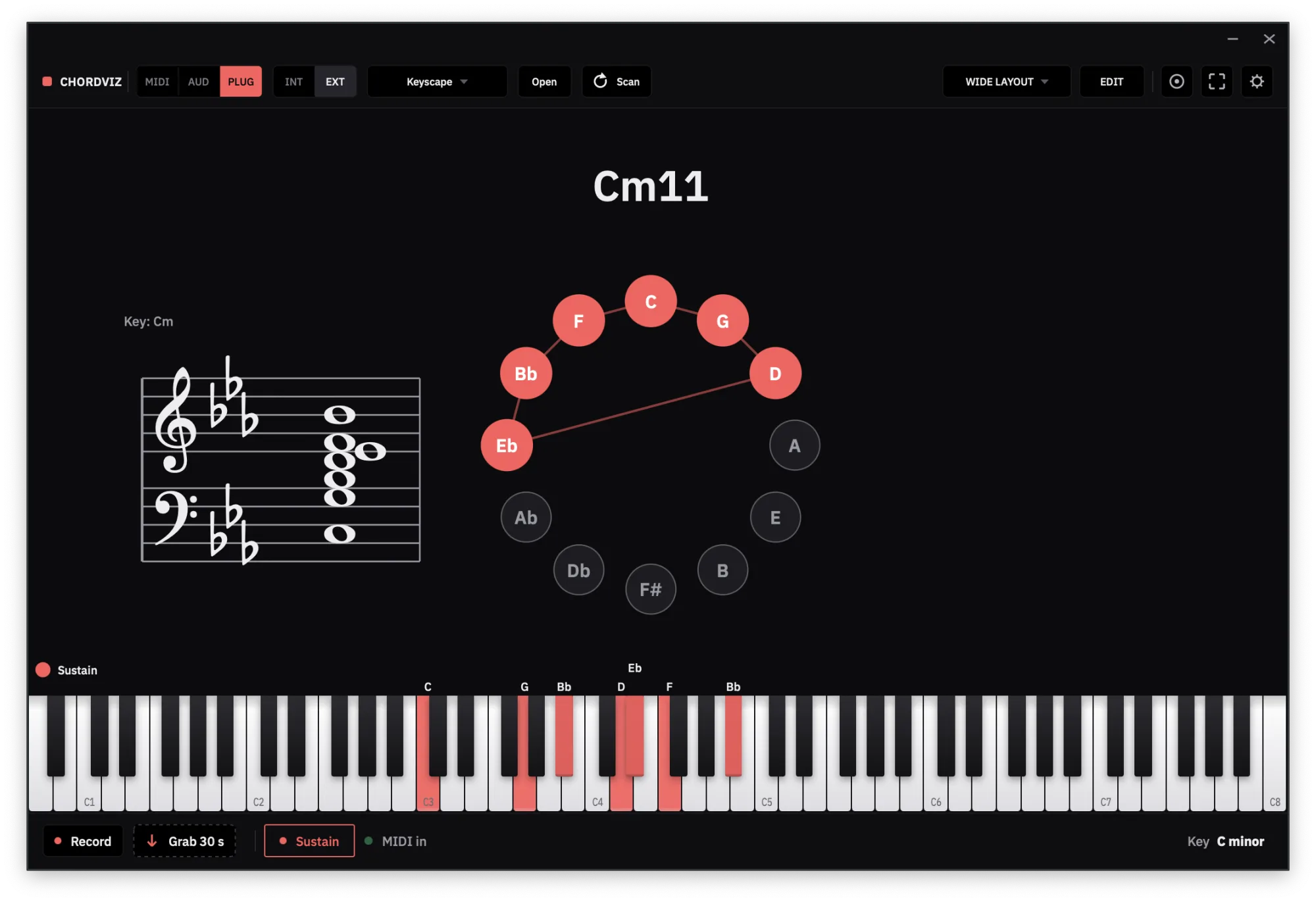
Play any voicing on your MIDI keyboard and ChordViz names it, with extensions, inversions and slash chords spelled correctly.
- Hold last chord. Staccato chords keep their label after you let go.
- Your own chord names. Unhappy with a label? Click the chord and give it your own name — it applies in every key.
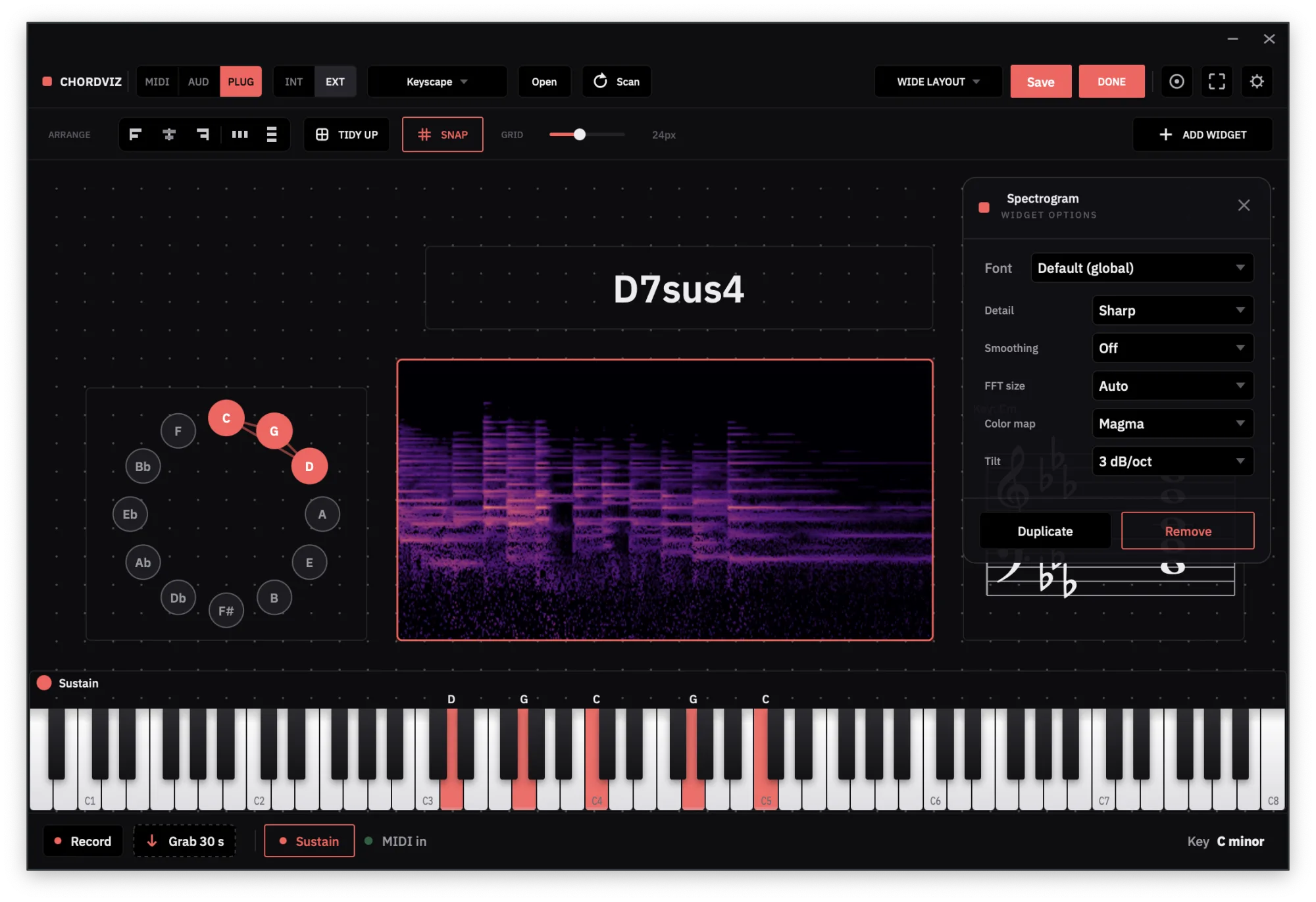
Unlimited layouts, designed by you
ChordViz isn't one fixed screen. Build the view you need, save it, then build another.
- Add or delete anything. Pick from 19 widgets and show exactly what you want to show.
- Arrange it your way. Drag, resize and restyle every widget on a snap-to-grid canvas.
- Save as many as you want. One per lesson, song or stream. Each reopens exactly as you left it.
See the theory
Piano keyboard, grand staff, circle of fifths and a live chord readout, with Roman numerals against your key and note names in letters or solfège (Do Ré Mi).
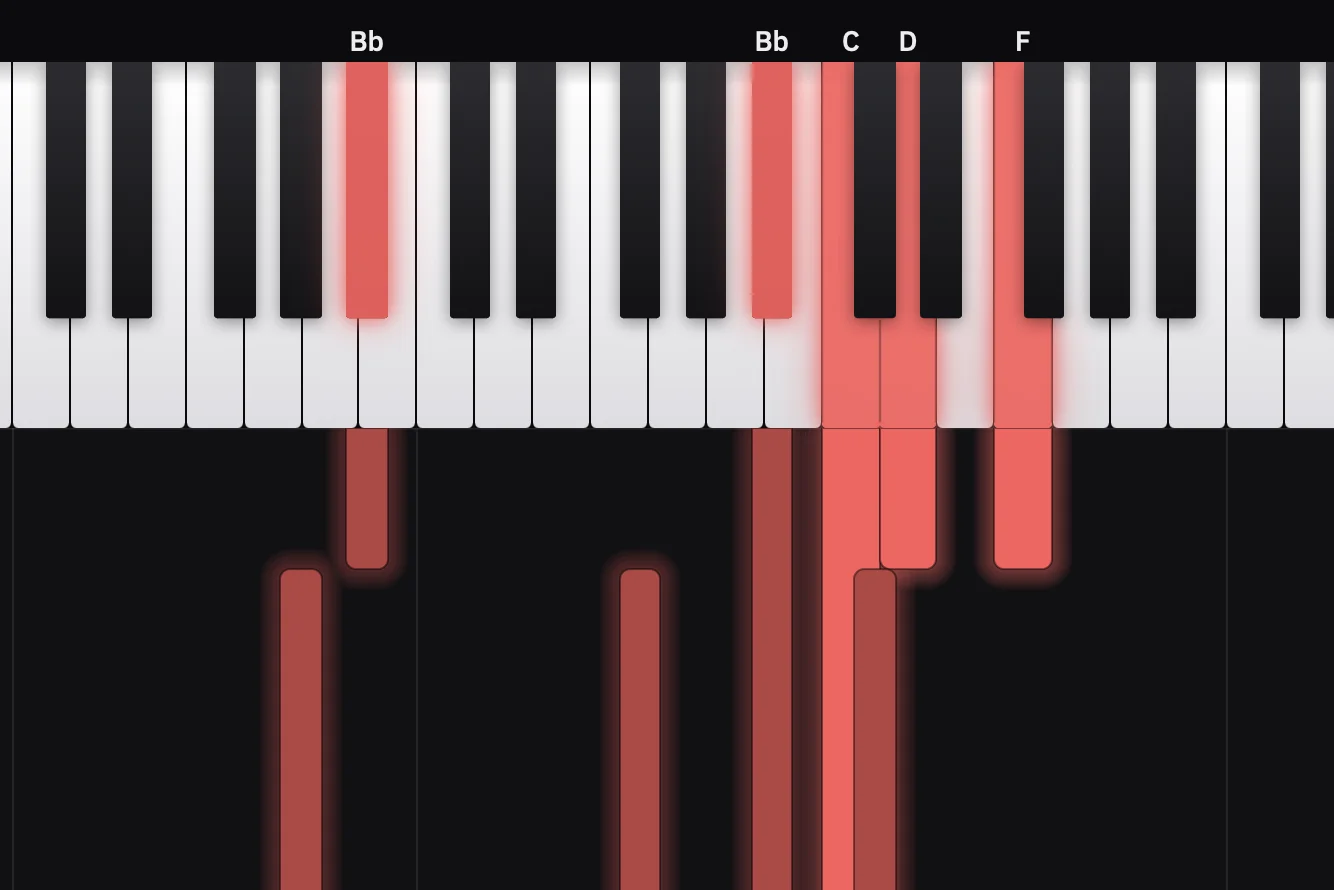
Play a MIDI file, watch every chord
Drop a .mid file on the window and every widget follows it like live playing, with a piano roll scrolling each note off the keyboard. Pause on any chord to study it, or record the whole thing as a video.
Studio-grade audio visualizer
Spectrum, spectrogram, oscilloscope, waveform, VU, LUFS and a stereo meter, reacting live to your sound.
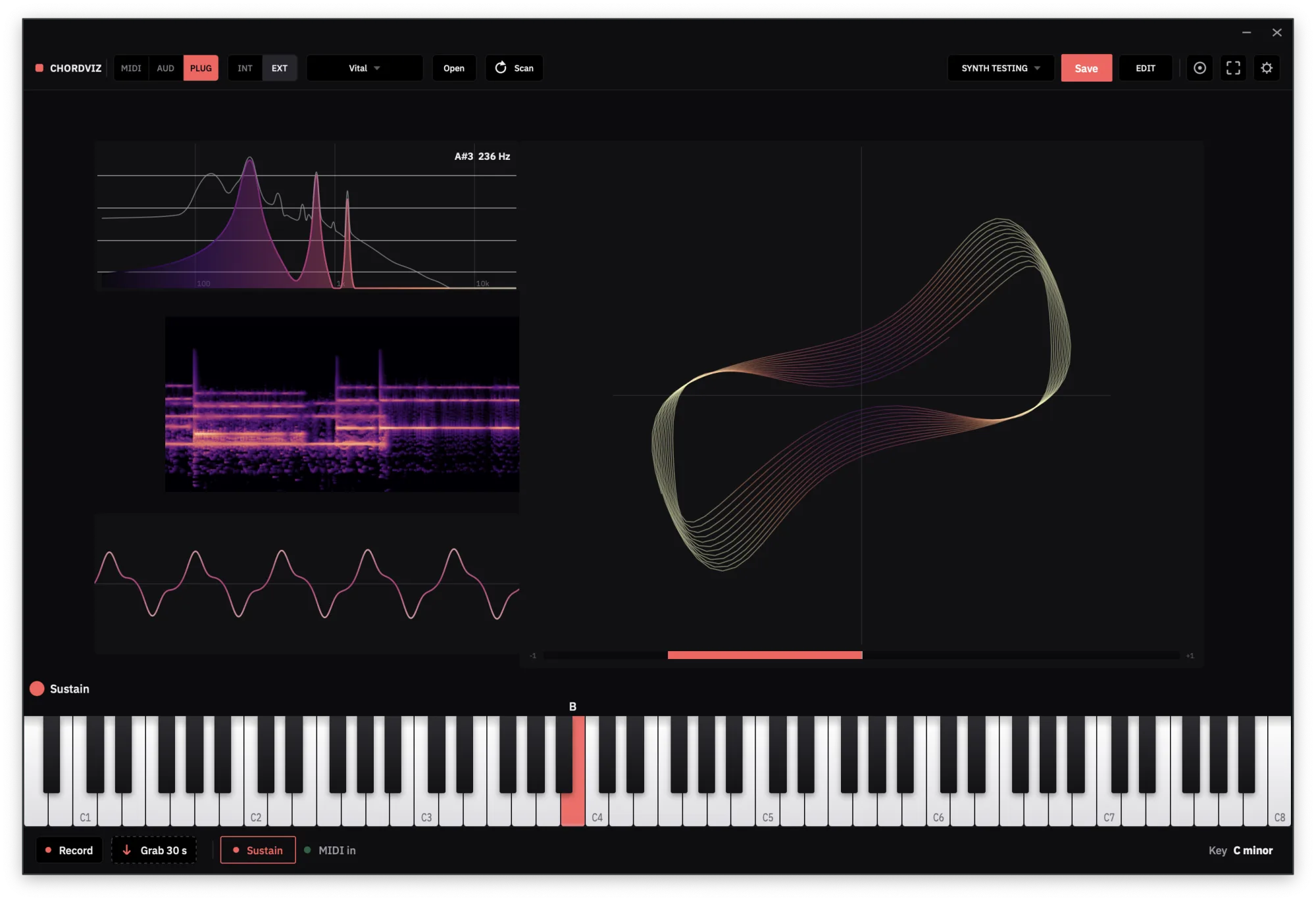
Make it yours, then get out of the way
Dark or light, your own accent color, background and fonts. Then focus mode hides every control, leaving just the visuals for the stage, the classroom or a second screen.
What creators are saying.
ChordViz is my new favorite teaching app! When I first heard about it, my immediate thought was, ‘This thing was made just for me.’
With all of its helpful features and customization options, it’s made my workflow so much easier. I’m able to teach better lessons and create music tutorials with way less stress and in a fraction of the time.
I can’t say enough good things about ChordViz. I absolutely love it!

As a music educator, I love ChordViz. It is honestly the best app of its kind for visual teaching and learning within music.
ChordViz goes far beyond my expectations and stands well above any other app I have used for my educational videos. It offers incredible customization to suit your teaching style or need.
In short, I give ChordViz my 100% recommendation to all music teachers, educators, and visual learners.

Quoted in full · Unedited · Published with permission
Hit record without leaving the app.
ChordViz captures itself — video with your audio mixed in, audio on its own, or the MIDI you played. Every take is saved and copied to your clipboard, ready to paste.
The window at 60 fps with your audio mixed in — native resolution, 1080p or 720p. Set a size cap and takes stay under it — 10 MB, say, to clear Discord's free upload limit.
Stereo WAV up to 32-bit float. Or grab the last 15 seconds you played — ChordViz is always listening, so the take you didn't plan isn't lost.
Your performance as a standard MIDI file, tempo and time signature included. Drop it on a track and keep editing.
No OBS required · Included in the free trial · No watermark · Video needs macOS 12.3+ or Windows 10 (1903)+
See it with your own playing.
Free for 30 days · Then $29 USD one time · Lifetime ChordViz updates
Play your own instruments in it.
Load the VST3 or Audio Unit instrument already on your machine and play it straight from ChordViz — it drives the visuals and lands in your recordings. No DAW in the loop.
Instrument plugins, one at a time · Not effects · Audio Units on macOS
- VST3 · AU
- VST3 instruments on Mac and Windows, Audio Units on Mac — found where they already live.
- Saved
- The instrument and your patch save with the layout, so the whole rig reopens together.
- Safe
- Scanned in separate processes — one misbehaving plugin can't take ChordViz down.
- Included
- A built-in synth plus sampled CP80, Wurlitzer and Pianet electric pianos.
19 MIDI & audio visualizers in one workspace
Combine chords, notation, keyboards, music-theory visuals and audio-reactive meters any way you like — in as many layouts as you want. Click any widget to see it live.
A standalone app for Mac & Windows.
ChordViz runs on its own — open it, play, and watch. No DAW required, and nothing to load it into: ChordViz is the host. For streams, it publishes a transparent live feed to OBS, Resolume or TouchDesigner — Syphon on macOS, Spout on Windows.
Full platform breakdown
| Capability | macOS | Windows |
|---|---|---|
| ChordVizUniversal on Mac — Apple Silicon and Intel | macOS 11+ | Windows 10 (1903)+ |
| MIDI keyboards and controllers | Supported | Supported |
| Microphone and audio interfaces | Supported | Supported |
| Included soundsBuilt-in synth plus three sampled electric pianos | Supported | Supported |
| VST3 instrumentsInstrument plugins, one loaded at a time — not audio effects | Supported | Supported |
| Audio Unit instrumentsAudio Units are a macOS-only plugin format; VST3 covers Windows | Supported | Not applicable |
| Video recordingSave as .mov or .mp4 on Mac, .mp4 on Windows | macOS 12.3+ | Supported |
| Audio and MIDI recording | Supported | Supported |
| Grab the last seconds you playedAudio only — video and MIDI are start/stop takes | Supported | Supported |
| Capture sound from other appsNeeds macOS 14.4 for Apple's audio-capture API | macOS 14.4+ | Supported |
| Webcam widget | Supported | Supported |
Linux support is in development, and not yet available to download.
Runs on its own · A VST3/AU build of ChordViz is coming later · Built on JUCE
Build your first ChordViz layout free for 30 days
Try the complete ChordViz workflow with no credit card required. Connect your setup, customize your dashboard, save your layouts, and see how ChordViz fits your workflow before purchasing.
$29 USD until October 31 · $49 USD from November 1
Questions & answers
Can ChordViz show the chords I play on my MIDI keyboard?
Yes. Plug in any MIDI keyboard or controller your Mac or PC recognises and ChordViz names each chord the moment you play it — root, quality, extensions, inversions and slash chords — on a big chord readout, a piano keyboard, a grand staff and a circle of fifths. Turn on Hold last chord and short, staccato chords stay on screen after you let go.
Can I design my own layouts?
Yes, as many as you want. Add or delete any of the 19 widgets — keyboard, chord name, staff, circle of fifths, piano roll, metronome, audio meters, webcam and more — then drag, resize and restyle them. Save each arrangement as a layout, and switch between them in a click.
Can I use ChordViz as a piano overlay in OBS, Twitch or YouTube Live?
Yes. Turn on the transparent background and live output, and ChordViz appears in OBS as a source with real transparency — through a Syphon Client on macOS or a Window Capture on Windows — so your keyboard and chord names sit over your camera with no green screen. You can also record a transparent video file for editing.
Can ChordViz play MIDI files?
Yes. Open a .mid file (or drag it onto the window) and it plays through your chosen instrument, driving every widget like live playing: the keyboard lights, the chord name and staff follow, and the Piano Roll widget scrolls each note away from the keyboard. You can loop, seek, mute the drum channel and pause on a chord to study it.
Does ChordViz detect chords from audio?
No — chord names come from MIDI, which is exact. Audio from a microphone, interface or other apps drives the audio visualizers (spectrum, waveform, VU, LUFS and more) and your recordings.
How do I start the free trial?
Download ChordViz and open it — the 30-day trial starts on first launch. There is nothing to sign up for and no credit card or payment information to enter.
What happens after the trial?
You can buy a ChordViz Founder License for $29 USD, one time — it's not a subscription. Your saved layouts remain on your device.
How many computers can I use my license on?
A license activates on 2 devices. You can see which devices are using it — and free a slot at any time — from your account on this site.