Guides
Get more out of ChordViz
Tutorials for ChordViz, the ways people use it, and how it compares with other chord visualizers.
Tutorials
How to show your piano keys on stream
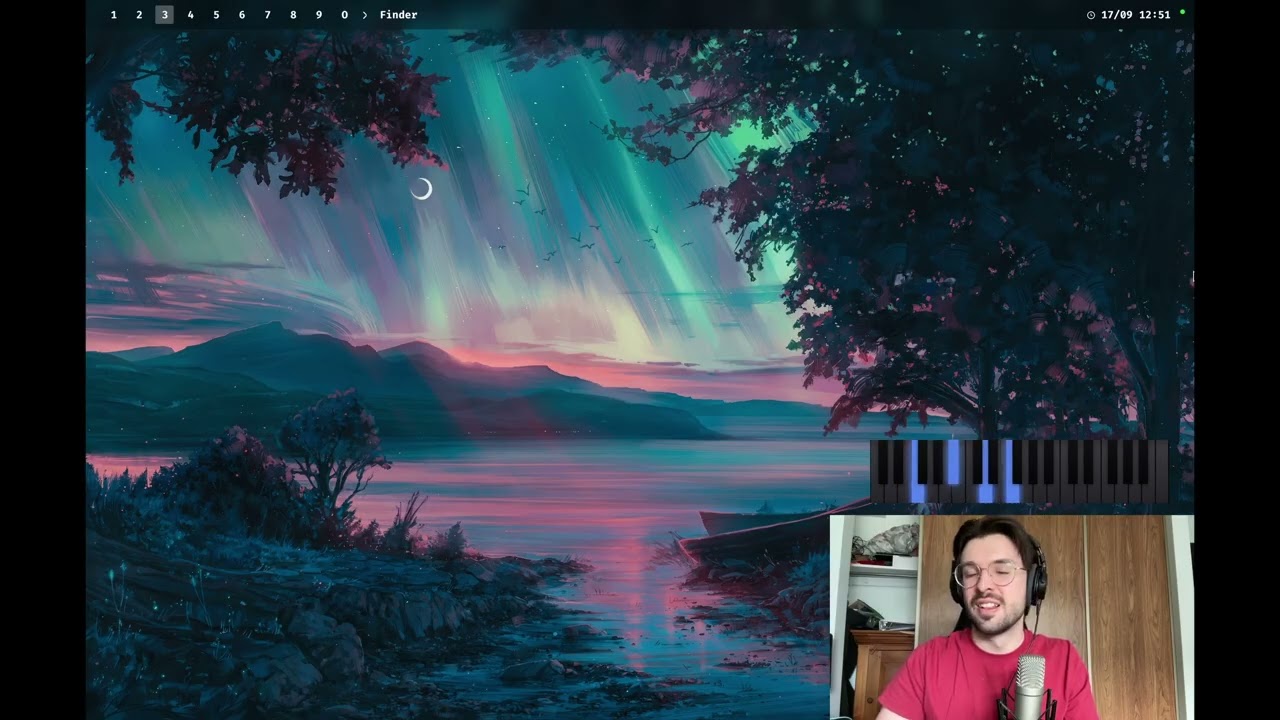
Put a live piano keyboard and the chord names over your Twitch or YouTube stream: connect your MIDI keyboard to ChordViz, build a stream layout, and add it to OBS with a transparent background.
How to make ChordViz transparent over your video
Turn on transparency mode and lay ChordViz over your webcam, screen capture or DAW — with no green screen and no compositing in post.
Use cases
Piano and chord overlay for OBS and live streams
ChordViz puts a live piano keyboard, chord names and notation over your stream with real transparency — no green screen. Play your MIDI keyboard and it shows up in OBS as its own source — Syphon on macOS, a Window Capture on Windows.
See what chord you're playing on your MIDI keyboard
ChordViz names every chord you play on a MIDI keyboard the moment it sounds — extensions, inversions and slash chords included — and shows it on a piano keyboard, staff and circle of fifths. Rename any chord your way and it applies in every key.
Show the theory while you play: ChordViz for music teachers
ChordViz shows students every chord you play — named the way you teach it, on a piano keyboard, staff, circle of fifths and more — in layouts you design yourself from 19 widgets. Rename any chord and your name is the one that shows, in every key. In online lessons, your student joins from their browser and you see their keys live.
A real-time MIDI visualizer for Mac and Windows
ChordViz turns MIDI into visuals the moment it arrives: a lit piano keyboard, the chord name, a grand staff, a circle of fifths and a piano roll, all moving together. Play any MIDI keyboard or open a MIDI file, and build the screen yourself from 19 widgets.