A real-time MIDI visualizer for Mac and Windows
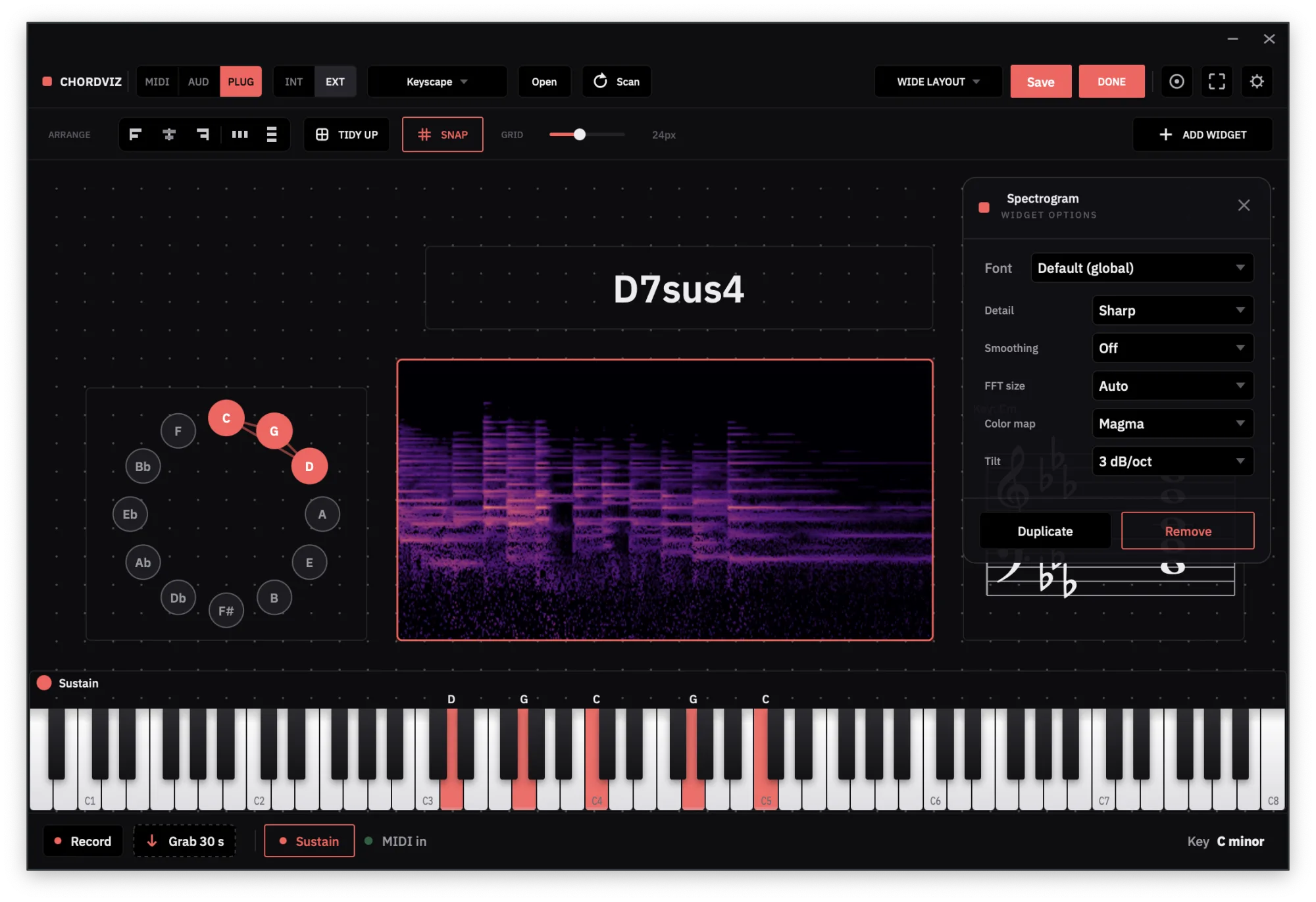
ChordViz turns MIDI into visuals the moment it arrives: a lit piano keyboard, the chord name, a grand staff, a circle of fifths and a piano roll, all moving together. Play any MIDI keyboard or open a MIDI file, and build the screen yourself from 19 widgets.
What it shows
Every widget reads the same MIDI, so everything moves together the moment a note arrives:
- Keyboard. The keys you press light up, held by the sustain pedal, with optional pitch- and mod-wheel displays.
- Chord Name. The chord you're holding, spelled properly: Cmaj9#11, Eb/G, Gsus4. Unhappy with a label? Click the chord and give it your own name.
- Staff. The notes on a grand staff, spelled for the key you're in.
- Circle of Fifths. Where the chord sits in the key you set.
- Piano Roll. A trail of every note you play, scrolling away from the keyboard. With a MIDI file loaded it can switch to falling notes that land on the keys.
- Pad Grid, Now Playing, Chromatic Strip, Key Badge, Metronome, Beat Bar and a set of audio meters (spectrum, spectrogram, waveform, oscilloscope, VU, loudness, stereo) for when you want to see the sound too.
You design the screen
Most MIDI visualizers give you one fixed picture. ChordViz gives you a canvas: add or delete any widget, drag and resize it, pick its colours and style, and save the result as a layout. Save as many layouts as you want, a bare keyboard for a stream, a full theory view for a lesson, a meter wall for mixing, and switch between them in a click. Each one reopens exactly as you left it, including the instrument you were playing.
Spelled for your key
Pick the key you're in and every widget spells for it. The same black key reads Db in F major and C# in A major, on the keyboard, the chord name, the staff and the chromatic strip at once, so a chord in E major shows as G#m, never Abm. Note names come in letters or solfège (Do Ré Mi), and the chord readout shows its Roman numeral against your key.
Turn on scale degrees and the keyboard and the Now Playing pills label each note by the job it does in the chord, 3, b7 or #11, instead of its letter.
Name chords the way you teach them
Unhappy with a label? Click the chord and give it your own name. If you hear the D in Ab-Cb-Gb-D as a #11, call it Abm7(#11) instead of Abm7b5. If you'd rather write b13 than #5, pick that. The name you choose follows that voicing into every key, and the Roman numeral and the degree labels change with it, so the whole screen tells the same story.
Any size, any shape
Drag the window to any size and the widgets scale with it. Or lock it to a shape: 16:9 for YouTube, 9:16 for Shorts, Reels and TikTok, 1:1 or 4:5 for a feed post, or 4:3. Resize it however you like and recordings stay in that format. Inside the window, every widget can be as big or as small as you want.
Live playing or a MIDI file
Plug in any MIDI keyboard or controller and play. Connect several at once if you like, and choose which ones play the instrument and which are only shown.
Or open a .mid file, or drop it on the window. It plays through ChordViz's built-in pianos or
your own VST3 instrument (or Audio Unit on a Mac), and drives every widget exactly like live playing.
Loop a passage, slow it down, scrub to a bar, or pause on a chord to read it.
From your DAW
ChordViz runs on its own, without a DAW. To visualize what your DAW is playing, send its MIDI to a virtual MIDI port (the IAC Driver on a Mac, loopMIDI on Windows) and pick that port in ChordViz like any keyboard.
Record what you see
Press Record and ChordViz captures its own window as a 60 fps video with the sound mixed in, plus WAV audio and a MIDI file of the same take, if you want them. Turn on the transparent background and the visuals drop over other footage in your editor with no green screen. Or send them live to OBS: piano overlay for OBS.
ChordViz at a glance
| Price | 30-day free trial, then $29 USD one time — no subscription |
|---|---|
| Runs on | macOS 11+ (Apple Silicon and Intel) · Windows 10 (1903)+ |
| Input | Any MIDI keyboard or controller, the on-screen keys, MIDI files, plus mic / interface audio for the meters |
| Visuals | Piano keyboard, chord name, grand staff, circle of fifths, piano roll, audio meters and more |
| Layouts | Unlimited — add, delete and arrange any of the 19 widgets, and save as many layouts as you want |
| Live output | Transparent feed to OBS, Resolume or TouchDesigner — Syphon on macOS, Spout on Windows |
| Recording | Video at 60 fps, WAV audio and MIDI files — no screen recorder needed |
Questions
- Which MIDI devices does ChordViz work with?
- Any MIDI keyboard, controller or pad your Mac or PC recognises, over USB or a MIDI interface. You can connect several at once and choose which ones play the instrument and which are only shown on screen.
- Can ChordViz visualize a MIDI file?
- Yes. Open a .mid file or drop it on the window and it drives every widget as if you were playing it: the keys light, the chord name and staff follow, and the Piano Roll can drop the file's notes onto the keys in its Falling mode. You can loop, scrub, change the tempo and pause on a chord.
- Does a MIDI file make sound in ChordViz?
- Yes. It plays through ChordViz's built-in pianos or a VST3 instrument you load (or Audio Unit on a Mac), so you hear it while you watch it, and that sound goes into your recordings.
- Can I change how the visualizer looks?
- Yes. Add or delete any of the 19 widgets, drag and resize them, change colours, key styles and backgrounds, and save the result as a layout. Save as many layouts as you want and switch between them in a click.
- Does ChordViz spell notes for the key I'm in?
- Yes. Pick a key and every widget follows it: the same black key reads Db in F major and C# in A major, on the keyboard, the chord name and the staff at once. You can also show scale degrees or Roman numerals, and rename any chord. The name you give it follows that voicing into every key.
- Can I record the visualizer as a video?
- Yes. ChordViz records its own window at 60 fps with the audio mixed in, so you don't need a screen recorder. Lock the window to 16:9, 9:16, 1:1, 4:5 or 4:3 and the video comes out in that shape. It can also record WAV audio and a MIDI file of the same take.